Free VMS software for IP cameras
PrimeVMS is a professional video management system for CCTV. Watch live, record around the clock and review footage from any ONVIF or RTSP camera. The core is free with no per-camera license, and advanced modules are available on affordable plans.
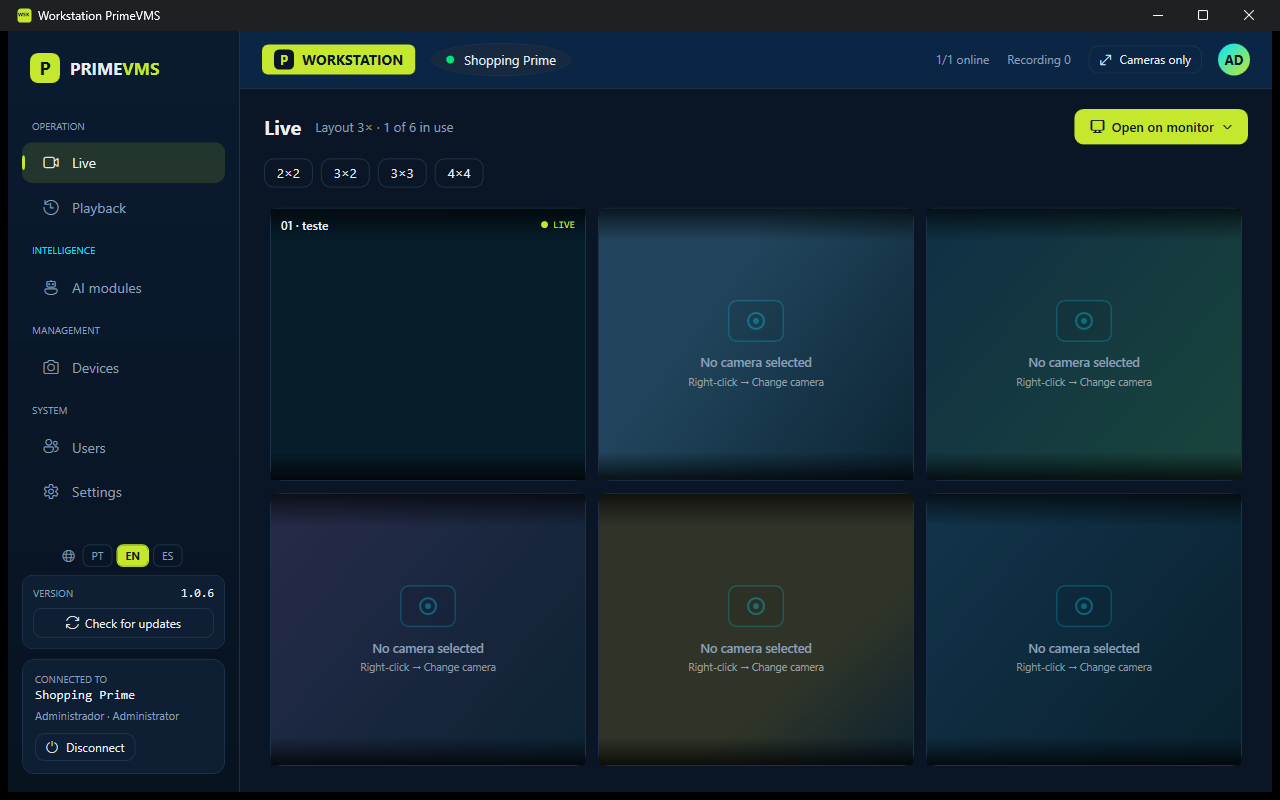
The essentials of a VMS, at no cost
The same software scales from a single computer to several servers.
Works with your cameras
Finds ONVIF cameras on the network and detects the RTSP stream path. You only enter the camera user name and password.
Continuous recording
Records to disk in segmented MP4 without re-encoding, with a recording catalog and retention by days.
Live view
Layouts up to 4×4, full screen, multiple monitors and video wall, with hardware-accelerated decoding.
Playback
Up to 16 cameras on one clock, reverse playback, motion search and signed export.
Export
Export images and video with a watermark that includes your logo, date and time.
Users and roles
Administrator, supervisor and operator roles, enforced by the server.
Distributed deployment
Run everything on one PC, or use a central server with several recording servers and operator stations.
Updates from the app
Only changed files are downloaded, usually about 1 MB. Releases are signed, and a failed update rolls back automatically.
Free core, paid modules
The VMS has no per-camera license. You pay only for the advanced modules you use.
PrimeVMS Free
- Live view, recording, playback and export
- Any ONVIF or RTSP camera, no per-camera license
- Users and roles
- Single PC or distributed servers
- Updates from the app
- English, Portuguese and Spanish
Advanced modules
- AI video analytics: people counting, face recognition, license plates, smart search and perimeter protection Free during testing
- More analytics: loitering, queues, fire and smoke, PPE In development
- Prime Cloud: remote and mobile access without opening ports Coming soon
- High availability: redundant central server Coming soon
How PrimeVMS compares
A modern option to VMS platforms that charge per camera.
| PrimeVMS | Typical VMS | |
|---|---|---|
| Core license | Free, no per-camera fee | Paid per camera or channel |
| Cameras | Any ONVIF or RTSP camera | Often tied to a brand |
| Deployment | One installer, from a single PC to distributed | Separate products or editions |
| Updates | From the app, with automatic rollback | Download and reinstall |
| Advanced features | Modules on affordable plans | Bundled in higher tiers |
How it works
One installer with three components. Install them on one PC or across your network.
Storage
The recording server. Pulls the RTSP stream from each camera, records to disk, applies retention and serves live and recorded video.
System Manager
The central server. Holds cameras, users and permissions, and assigns each camera to a recording server.
Workstation
The operator application. Live layouts, playback timeline, multiple monitors and export.
Frequently asked questions
Is PrimeVMS free?
Yes. Live view, recording, playback, export, users, distributed deployment and updates are free, with no per-camera license. AI analytics are also free during the current testing phase. Prime Cloud and high availability will be paid modules.
Which cameras are supported?
Any IP camera with ONVIF or RTSP. PrimeVMS finds ONVIF cameras on the network and detects the stream path.
Can it replace an NVR?
PrimeVMS records IP cameras directly on a Windows PC or server, with retention by days. It can also record from existing recorders that provide RTSP streams.
How many cameras can I add?
The free version has no per-camera limit. The practical limit depends on hardware and network. For larger sites, use a distributed deployment with several recording servers.
Which languages are available?
English, Portuguese (Brazil) and Spanish, in the apps, the installer and the release notes.
Get started for free
Download the installer, choose a single PC or a distributed setup, and add your cameras.